ROULETTE CHAINS PRO MANUAL: 2 - Main functions of the program
Let's start the analysis of the interface and functions of the program from the top of the window:

In the upper right corner there are buttons for closing and minimizing the application, as well as a "question" button, when clicked, a window will open in the browser and you will go to the page of the program's manual (here).

The program shows the last 10 numbers from the current game session. The last number drawn is on the left (in this case it is 21).

The button to cancel the last entered number is a very important element of the program, because an incorrectly entered number can distort the data on the chains, up to an incorrect prediction in the end! It is important to understand that when you click this button, the program returns more than 100 variables to the previous value. And despite the fact that the button works properly, it is still not recommended to press it just like that...

To the left of the section with the dropped numbers there are buttons for loading and saving all numbers from the current game session to a file. Button L - load previously saved numbers from a file into the program. Button S - save numbers from the current session to a file.

In the center of the program window there is the main section - a panel for entering numbers into the program and a panel that displays the current prediction of the program.
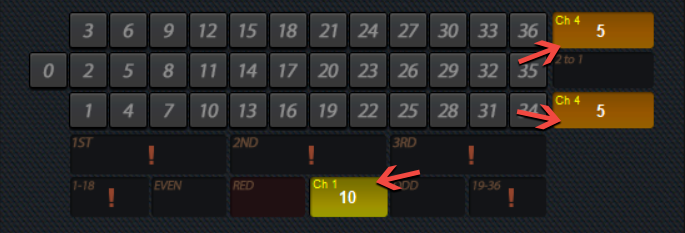
When the program is ready to make a prediction, it highlights the corresponding fields and also shows the size of the bet on a particular field. In the example, you need to bet 5 units on the first and third columns, as well as a bet of 10 units on black.
It is worth emphasizing once again that the Roulette Chains PRO program is an advanced chain analysis algorithm, and can bet on dozens and columns (not just on equal chances, as the classical version of the theory implies). In this case, the bet is always placed on 2 dozen or 2 columns, since this is objectively the only way to apply dozens/columns betting in "Chains" system.
Please note that in addition to the bet size, there is a yellow text in the upper left corner that shows which chain scheme (out of 22) is active on this bet. And also when you hover over this text, you will see a tooltip that will show which specific chain pattern was determined in this prediction.
It is worth emphasizing once again that the Roulette Chains PRO program is an advanced chain analysis algorithm, and can bet on dozens and columns (not just on equal chances, as the classical version of the theory implies). In this case, the bet is always placed on 2 dozen or 2 columns, since this is objectively the only way to apply dozens/columns betting in "Chains" system.
Please note that in addition to the bet size, there is a yellow text in the upper left corner that shows which chain scheme (out of 22) is active on this bet. And also when you hover over this text, you will see a tooltip that will show which specific chain pattern was determined in this prediction.

On the prediction panel, you can periodically see such an icon ( ! ) - this is a possible bet indicator. The very function that will make your work with the program as comfortable as possible! This indicator shows the POSSIBLE bet on a particular field on the next move. The rationale for using this function is as follows: if you set a large chain lenght for analysis in the settings (for example, 14), then many empty spins can pass before the program issues a prediction. The indicator will allow you to be ready to bet on the next turn if, for example, you are playing on a table with a hard time limit for betting. In the example, the indicator shows that, perhaps, on the next move, the program will bet on any 2 dozen (out of three) and on one of the sector of equal chances: 1-18 or 19-36 .

Below the forecast panel, in the bottom center is a button that expands (or collapses) the options and statistics panel. The presence of this button allows you to access a lot of program settings and at the same time keep the program compact on the screen, which is a very important factor for many players!

The statistics panel, respectively, displays statistics on the occurrence of certain fields in percentage terms:
Red/Black - statistics on red and black numbers
Even/Odd - statistics on even and odd numbers
Less/Mode - statistics on smaller numbers (1-18) and large (19-36) numbers
1ST D / 2ND D / 3RD D - statistics on dozens
1ST C / 2ND C / 3RD C - statistics on columns
It should be noted that if you use the function of loading previously saved numbers into the program, the statistics for all fields will be automatically recalculated.
Red/Black - statistics on red and black numbers
Even/Odd - statistics on even and odd numbers
Less/Mode - statistics on smaller numbers (1-18) and large (19-36) numbers
1ST D / 2ND D / 3RD D - statistics on dozens
1ST C / 2ND C / 3RD C - statistics on columns
It should be noted that if you use the function of loading previously saved numbers into the program, the statistics for all fields will be automatically recalculated.
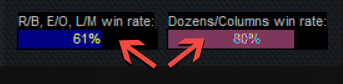
Under the statistics data there are indicators indicating the percentage of winning bets:
R/B, E/O, L/M - the total percentage of winnings for all fields of equal chances
Dozens / Columns - the percentage of winnings for dozens and columns
R/B, E/O, L/M - the total percentage of winnings for all fields of equal chances
Dozens / Columns - the percentage of winnings for dozens and columns
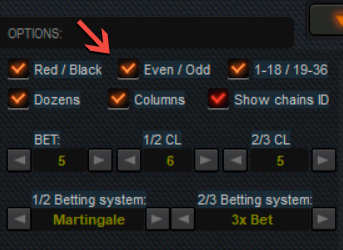
By default, the program includes analysis for all fields, but in the options section, you can exclude one or more fields from predictions at any time (for example, turn off columns and leave only dozens)
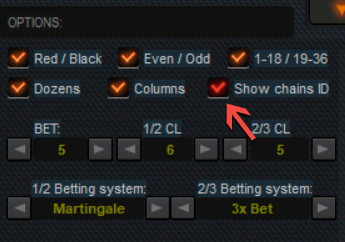
The "Show chains ID" parameter allows you to disable (or enable) the display of chains IDs in predictions (yellow text, which is displayed in the upper left corner of the bet).
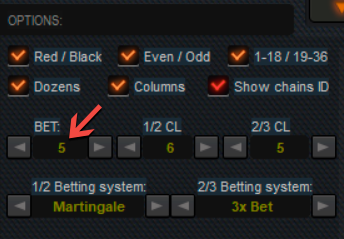
The BET parameter allows you to set the size of the initial bet. Clicking on the left arrow decreases the initial bet, clicking on the right arrow increases the initial bet.
IMPORTANT: if you want to set a large initial bet (or reduce the bet from a large size to a minimum one), click on the left (or right) arrow and do not release the mouse button - the bet will begin to change with acceleration. This is much more convenient than trying to quickly click the mouse.
IMPORTANT: if you want to set a large initial bet (or reduce the bet from a large size to a minimum one), click on the left (or right) arrow and do not release the mouse button - the bet will begin to change with acceleration. This is much more convenient than trying to quickly click the mouse.

Perhaps the main parameter in setting up the program is setting the length of the chains, which the program will be guided by during the analysis!
1/2 CL - setting the total length of the chains for equal odds fields
2/3 CL - setting the total length of the chains for dozens and columns
We will talk more about setting the length of the chains in the next chapter. But in short, the logic is as follows: the longer the chains you set, the longer the expectation of the predictions will potentially be, but the probability of winning back the bet will be higher. The same is true and vice versa - the shorter the chain length you set, the more often the program gives predictions, but their accuracy is potentially reduced.
1/2 CL - setting the total length of the chains for equal odds fields
2/3 CL - setting the total length of the chains for dozens and columns
We will talk more about setting the length of the chains in the next chapter. But in short, the logic is as follows: the longer the chains you set, the longer the expectation of the predictions will potentially be, but the probability of winning back the bet will be higher. The same is true and vice versa - the shorter the chain length you set, the more often the program gives predictions, but their accuracy is potentially reduced.
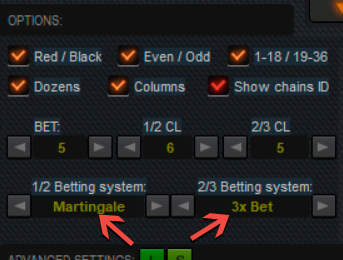
Another important point in setting up is the setting of progressive betting systems that the program will use in predictions:
1/2 Betting system - betting system for equal chances
2/3 Betting system - betting system for dozens and columns
You can choose from four possible betting systems for equal chances and for dozens and columns, and also set FLAT if you are going to play without progression.
1/2 Betting system - betting system for equal chances
2/3 Betting system - betting system for dozens and columns
You can choose from four possible betting systems for equal chances and for dozens and columns, and also set FLAT if you are going to play without progression.
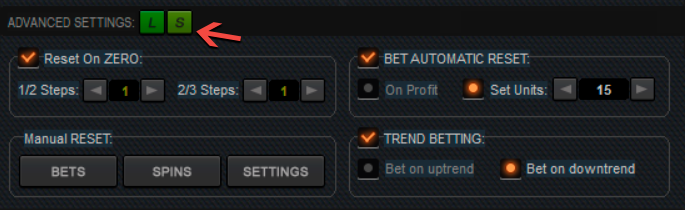
Before we analyze the functions in the advanced settings section, I want to draw your attention to one more buttons L and S - these are also very useful elements of the program, they allow you to save and load all program settings from a file! If you use the program to the maximum, namely, to set the size of the initial bet, set the length of the chains, select certain betting systems for certain fields, and also use all the parameters in the advanced settings, then loading the previously saved parameters will significantly save your time after starting the program !

So the first option in advanced settings is Reset On Zero . This feature automatically resets the bet to the initial size when ZERO comes up. The Steps parameters determine up to what step the program can reset the bet according to the selected progression. Steps refer to the steps of increasing the bet.
For example, if we take the Martingale system, then the steps will be as follows:
1 - 2 - 4 - 8 - 16 - 32 - 64 - 128 - 256 and so on ...
1/2 Steps - definitions of steps for equal chances
2/3 Steps - definition of steps for dozens/columns
Thus, if you have 1 in your settings, then if zero falls out, the program will reset the bet on the first step. That is, on the next move, the bet will again be 1.
If ZERO fell out, but the current bet was 2, then the program will not automatically reset and will continue to increase the bet in accordance with the selected progression.
I consider this parameter to be very important, since all outside bets are always "afraid" of ZERO. And if this sector fell on the first step of the progression, it may be better to lose this bet for reasons of overall session security. After all, if you are an experienced player, then you have repeatedly met the case of three (or even four) identical numbers falling out in a row. And this does not mean at all that "the casino is trying to scam you" - this is a completely normal picture for roulette (unless, of course, this is repeated several times in 1 session)
For example, if we take the Martingale system, then the steps will be as follows:
1 - 2 - 4 - 8 - 16 - 32 - 64 - 128 - 256 and so on ...
1/2 Steps - definitions of steps for equal chances
2/3 Steps - definition of steps for dozens/columns
Thus, if you have 1 in your settings, then if zero falls out, the program will reset the bet on the first step. That is, on the next move, the bet will again be 1.
If ZERO fell out, but the current bet was 2, then the program will not automatically reset and will continue to increase the bet in accordance with the selected progression.
I consider this parameter to be very important, since all outside bets are always "afraid" of ZERO. And if this sector fell on the first step of the progression, it may be better to lose this bet for reasons of overall session security. After all, if you are an experienced player, then you have repeatedly met the case of three (or even four) identical numbers falling out in a row. And this does not mean at all that "the casino is trying to scam you" - this is a completely normal picture for roulette (unless, of course, this is repeated several times in 1 session)
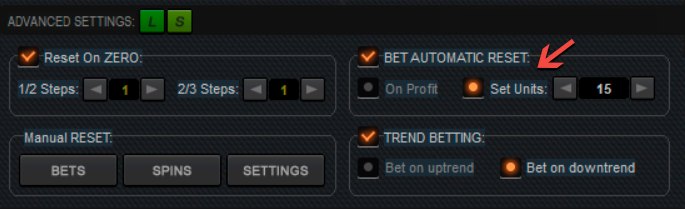
The BET AUTOMATIC RESET feature sets the bet to automatically reset when a certain profit target is reached. You can choose one of two options:
On Profit - reset the bet when any minimum profit is reached
Set Units - reset the bet when a certain number of units is reached
If we take the example above - when the program reaches a profit of +15 units, the bet will be reset to the initial size, and the countdown of profit will start over. In general, this feature is only needed when using alternative betting systems such as Donald or Blind, since in classic progressions the bet is reset on any win.
On Profit - reset the bet when any minimum profit is reached
Set Units - reset the bet when a certain number of units is reached
If we take the example above - when the program reaches a profit of +15 units, the bet will be reset to the initial size, and the countdown of profit will start over. In general, this feature is only needed when using alternative betting systems such as Donald or Blind, since in classic progressions the bet is reset on any win.
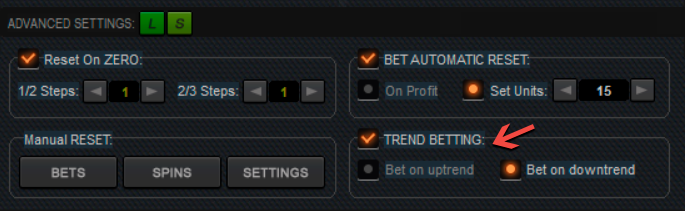
TREND BETTING feature - This is a completely new experimental element. This function allows you to use a certain trading principle in the game - the program focuses on statistics and can make the following bets:
Bet on uptrend - bets on the trend. For example, if red numbers fell out more than black ones, then in predictions the program will bet only on red, ignoring black.
Bet on downtrend - bets against the trend. Then if, for example, again, red numbers fell out more than black ones, the program will bet only on black!
Bet on uptrend - bets on the trend. For example, if red numbers fell out more than black ones, then in predictions the program will bet only on red, ignoring black.
Bet on downtrend - bets against the trend. Then if, for example, again, red numbers fell out more than black ones, the program will bet only on black!

In the lower left part of the program there are manual reset buttons:
BETS - reset all bets to the initial size (all progressions return to the 1st step)
SPINS - complete clearing of the history of dropped numbers (in the current session), as well as resetting all statistics
SETTINGS - returns the default settings
BETS - reset all bets to the initial size (all progressions return to the 1st step)
SPINS - complete clearing of the history of dropped numbers (in the current session), as well as resetting all statistics
SETTINGS - returns the default settings










.png)


